Why I Built My Own GCP Cleanup Tool Instead of Using Google's?

427 GCP projects. That's what I was staring at when I finally decided something had to change.
Since founding my company in 2014, I'd accumulated over a decade of cloud sprawl. Dev environments. Staging copies. Client demos. Experiments that never went anywhere. Projects named "My First Project" that nobody remembered creating. Sound familiar?
I knew this was a problem. The numbers are staggering:
Gartner estimates $135 billion in cloud resources will be wasted in 2024 alone
McKinsey found 28% of cloud spend is wasted after analyzing $3 billion in enterprise spending
Harness projects $44.5 billion in infrastructure waste for 2025 due to FinOps-developer disconnect
Forrester reports 41% of organizations cite lack of skills as the biggest cloud waste factor
But knowing and doing are different. What finally pushed me over the edge was realizing I had no idea which of those 427 projects were actually necessary.
Google has tools for this. I built my own instead. Here's why.
The Challenge: A Decade of Cloud Sprawl
How I Got Here
The sprawl didn't happen overnight. It crept up on me.
In 2014, GCP was my playground. Every new feature meant a new project. Every client demo got its own sandbox. We had no governance, no naming conventions, no cleanup process. By default, everyone in a Google Workspace domain gets Project Creator and Billing Account Creator roles. A governance problem hiding in plain sight.
Looking back, the warning signs were clear. If you see lots of "My First Project" or "My Project XXXXX" in your organization, you've got the same problem I had.
The Triple Threat: Cost, Security, Carbon
The damage wasn't just financial. It was a triple threat.
Cost: Zombie projects burning budget I couldn't track. Persistent disks attached to nothing. Unattached disks keep billing at full price even after the VM is gone. I had no visibility into what was actually necessary.
Security: Forgotten projects meant unpatched vulnerabilities. Compliance gaps. 90% of IT leaders manage hybrid cloud environments, and 35% cite securing data across ecosystems as their top challenge. I was part of that statistic.
Carbon: Every idle resource burns energy. Not the biggest concern, but it added up. Cleaning house meant reducing my environmental footprint too.
Why I Didn't Use Google's Tools
Google offers solutions for this exact problem. I evaluated them all. I didn't use them.
The Official Options
Google Remora is the obvious choice. It's a serverless solution that uses the Unattended Project Recommender to identify unused projects, notify owners, and delete after a configurable TTL. Dry-run mode by default. Three-wave notification escalation. Sounds perfect, right?
Here's the catch: Remora carries a disclaimer that it's "not an official Google project" and "not supported by Google." But even setting that aside, the setup is substantial. You need Cloud Scheduler, Cloud Workflows, service accounts with specific IAM bindings, and a dedicated project to run it all. The irony wasn't lost on me: creating another project to manage my project problem.
For small-to-medium portfolios, that overhead might be acceptable. For 400+ projects accumulated over a decade, with complex dependencies and shared resources, I wanted something simpler that I could understand completely.
DoiT SafeScrub solves a different problem entirely: cleaning resources within a single project. It's designed to wipe a dev environment clean at the end of the day. Great for that use case. But I didn't need to clean resources inside projects. I needed to identify which of my 400+ entire projects were obsolete and could be deleted safely. SafeScrub doesn't even look at the organization level. Different tool, different problem.
Cloud Asset Inventory is Google's native visibility tool, but visibility isn't cleanup. It only retains 35 days of history and requires you to build your own automation on top using Cloud Functions and BigQuery exports. It's a foundation, not a solution. At 427 projects, I needed something that would actually do the work, not just show me the problem.
I also evaluated community alternatives: gcp-cleaner (a self-described "non-comprehensive cleanup script"), gcloud-cleanup (Travis CI's internal tool for cleaning test instances), and bazooka (a gcloud wrapper for bulk deletions by name filter). All useful for their specific purposes, but none designed for organization-wide project lifecycle management.
What I Actually Needed
My requirements were specific:
Lightweight automation without enterprise complexity. I'm a small team, not a Fortune 500.
Two-tier classification to avoid accidentally flagging active projects. Binary delete/keep isn't nuanced enough when projects share IAM bindings, VPCs, or service accounts.
Human-in-the-loop approval before any deletions. GCP's 30-day recovery window is a safety net, but paranoia is healthy when you're deleting infrastructure.
Integration with existing workflows. I already had monitoring and alerting. I didn't want another disconnected tool.
Free and open source. I'd already spent enough on cloud bills.
Hesitation to share my credentials with 3rd party solutions. Mine worked with GCLOUD CLI’s existing login, and I kept the script open on Github for anyone to scan what its doing in a quick glimpse.
No existing tool checked all those boxes. So I built one.
Building the Solution
The Discovery Phase
I started with the Cloud Asset Inventory API. The key insight: instead of querying each service individually (which would take 4-8 API calls per project), I could get all resources in a single call per project. At 427 projects, that's the difference between 1,708-3,416 API calls and just 427.
The API's searchAllResources endpoint returns every resource in a project with one request:
gcloud asset search-all-resources --scope=projects/my-project-id --format=json
The response is a JSON array containing every resource in the project, regardless of service type. Here's what a typical response looks like (truncated for clarity):
[
  {
    "name": "//compute.googleapis.com/projects/my-project/zones/us-central1-a/instances/web-server",
    "assetType": "compute.googleapis.com/Instance",
    "updateTime": "2025-03-15T10:30:00Z",
    "createTime": "2024-01-10T08:00:00Z"
  },
  {
    "name": "//storage.googleapis.com/projects/_/buckets/my-backup-bucket",
    "assetType": "storage.googleapis.com/Bucket",
    "updateTime": "2024-06-01T14:00:00Z",
    "createTime": "2023-02-20T09:00:00Z"
  },
  {
    "name": "//sqladmin.googleapis.com/projects/my-project/instances/prod-db",
    "assetType": "sqladmin.googleapis.com/Instance",
    "updateTime": "2025-01-10T08:45:00Z",
    "createTime": "2022-11-15T16:30:00Z"
  }
]
My script iterates through all 427 projects in parallel (10 workers by default), makes this single call per project, and categorizes resources by their assetType:
Compute →
compute.googleapis.com/Instance,/Disk,/Snapshot,/ImageStorage →
storage.googleapis.com/BucketDatabases →
sqladmin.googleapis.com/InstanceServerless →
appengine.googleapis.com/Application,cloudfunctions.googleapis.com/CloudFunctionOther → Everything else the API returns
For each project, the script finds the most recent updateTime across all resources. That becomes the project's "last activity" date. The classification logic:
No resources at all → Obsolete (empty project)
180+ days since last update → Obsolete (abandoned)
90-180 days → Review required (potentially obsolete)
Project state not ACTIVE → Obsolete (already marked for deletion)
My prototype used Python and the gcloud CLI. Nothing fancy. The goal was understanding what existed before taking any action.
Key Implementation Decisions
The architecture was deliberately simple: a CLI tool that runs locally. No Cloud Functions. No Cloud Scheduler. Just Python and the APIs I already had access to.
Dry-run by default. JSON reports of what would be deleted. No deletions until you confirm.
Auto-resume. Interrupted scans pick up where they left off.
Parallel scanning. 10 worker threads by default.
The output is two JSON files: obsolete_projects_report.json with the full categorized analysis, and projects_for_deletion.json with the deletion-ready candidates. Review them. Edit them. Then run the delete phase only on what you've approved.
# The core classification logic
def classify_project(project, last_activity_days):
    if last_activity_days > 180:
        return "safe_to_delete"
    elif last_activity_days > 90:
        return "review_required"
    return "keep"
Results and Impact
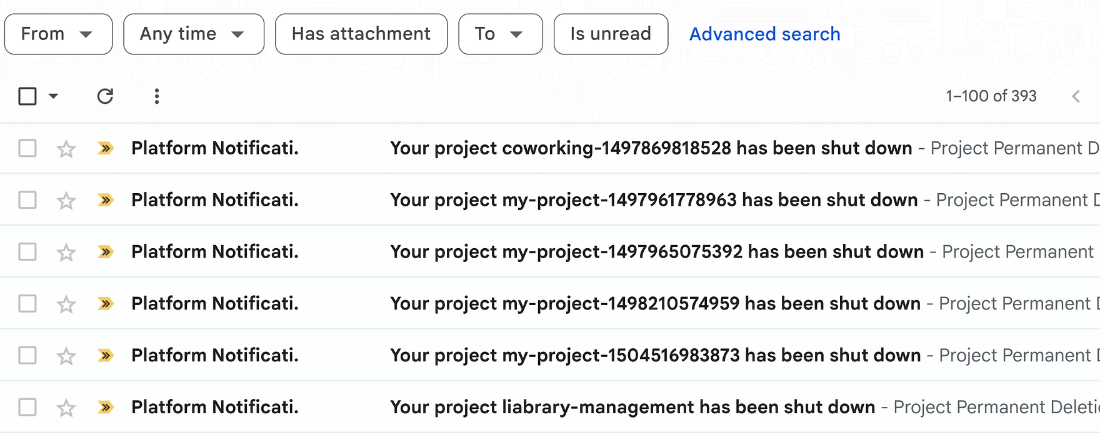
You might be bombarded with emails from Google after running the final deletion script
Some Stats
393 zombie projects identified and safely removed
Cost reduction: Decrease in monthly GCP spend
Security: 12 projects with deprecated APIs discovered and addressed
Time savings: What would have taken weeks of manual audit happened automatically
The ROI math is simple. Systematic zombie elimination can achieve 20-64% cost reductions with 300-500% ROI in the first year. I'm at the lower end of that range, but I'll take it.
Unexpected Benefits
Beyond the obvious metrics, some surprises:
Organizational visibility. For the first time, I actually knew what we were running. Every project had a purpose or got deleted.
Compliance confidence. Auditors love documentation. Now I had an audit trail for project lifecycle.
Team clarity. Owners assigned. Responsibility clear. No more "I thought someone else was handling that" conversations.
Knowledge preservation. Documenting why each project existed forced conversations that should have happened years ago.
Lessons Learned: What Worked and What Didn't
What Worked
Start small. Testing on non-production first caught edge cases that would have caused real damage.
Two-tier classification. The 90-180 day "review required" bucket saved me from deleting several projects I would have regretted.
Manual approval gates. Fully automated deletion sounds efficient. It's also terrifying. Human review saved me twice.
Weekly cadence. Monthly was too slow. Weekly scans catch drift before it becomes sprawl.
What I'd Do Differently
Enforce tagging from day one. Labels indicating owner, environment, and purpose would have made cleanup trivial. Retrofitting tags to 400+ projects was painful.
Set per-project budgets earlier. Cost alerts at the project level, not just the billing account. Would have caught zombie projects years sooner.
Document project purpose on creation. A simple README requirement for every new project. Future you will thank present you.
Establish org policies sooner. Disable project creation at the org level except for specific roles. Prevention beats cleanup every time.
FAQs
Is this safe for production environments?
Yes, with proper testing. The two-tier classification and dry-run mode are non-negotiable. Always review the "needs review" category manually, and never run automated deletion without understanding what will be affected.
How long does cleanup take?
Initial audit took about three weeks of part-time work. Ongoing maintenance is maybe two hours per month reviewing reports and approving deletions.
Can I use this with fewer than 400 projects?
Absolutely. Even 10-20 projects benefit from automation. The principles scale down. You don't need enterprise-grade chaos to justify better governance.
What about Google Cloud Remora?
Great tool for smaller portfolios. If you're under 50 projects and don't have complex dependencies, try Remora first. My situation required something more customized.
Try it yourself (safely)
The tool is available on GitHub. Star it if it's useful. Open an issue if something doesn't work. I built this for my needs, but maybe it helps with yours.
You don't need 400 projects to benefit from better cloud governance. The best time to start was ten years ago. The second best time is now.
What's your project cleanup strategy? Drop a comment.
References
Official Documentation:
Automated Cleanup of Unused Google Cloud Projects - Google Cloud Blog
Remora Project Cleaner - GoogleCloudPlatform GitHub
Cloud Asset Inventory Overview - Google Cloud Documentation
Cloud Governance:
How to Prevent Project and Billing Sprawl - Medium Google Cloud Community
How to Structure Your Enterprise on GCP - DoiT International
Cost Optimization:
How to Eliminate Zombie Resources - CloudNuro
Zombie Resources: How Dead Cloud Assets Drain Your Budget - Cloud and Clear
Community Tools:
gcp-cleaner - Resource cleanup script by Paul Czarkowski
gcloud-cleanup - Travis CI's test instance cleanup tool
bazooka - Bulk deletion wrapper for gcloud