Top Salesforce Integration Tools Businesses Use Today
Salesforce integration tools, also known as CRM integration tools, help businesses connect their CRM with other applications and automate workflows.
Salesforce already plays a powerful role in managing customer relationships, but its true strength comes from how it connects your entire business. When you connect it with the right tools, it genuinely becomes the heart of your business. Salesforce Integration isn't just a technical step; it’s what allows Salesforce to sync data with other platforms, take over repetitive workflows, and finally get those "lonely" applications talking to each other.
For a startup, this is about moving fast and staying connected.
In this blog, we’ll look at the most powerful integration tool that helps bridge the gap between Salesforce and your other apps to keep your operations running smoothly.
Why Do Businesses Connect Salesforce with Other Systems?
Businesses use different tools alongside Salesforce, and they rely on API integration tools to connect these systems and automate data flow. Through API integration services and an enterprise integration platform, companies connect these systems to enable business systems integration and smooth data integration. This creates a unified data architecture where information moves automatically between platforms.
With this approach, organizations achieve customer data unification, meaning every department works with the same accurate customer information. A real-time customer data platform ensures updates happen instantly across connected systems.
Example: When a customer submits a support request, the data updates in Salesforce, notifies the support team, and creates a follow-up task for the sales team automatically.
Now that we understand why businesses rely on integrations, let’s explore the integration flow
The Integration Flow: How It Works
To visualize a unified data architecture, consider this standard flow for a New Customer onboarding:
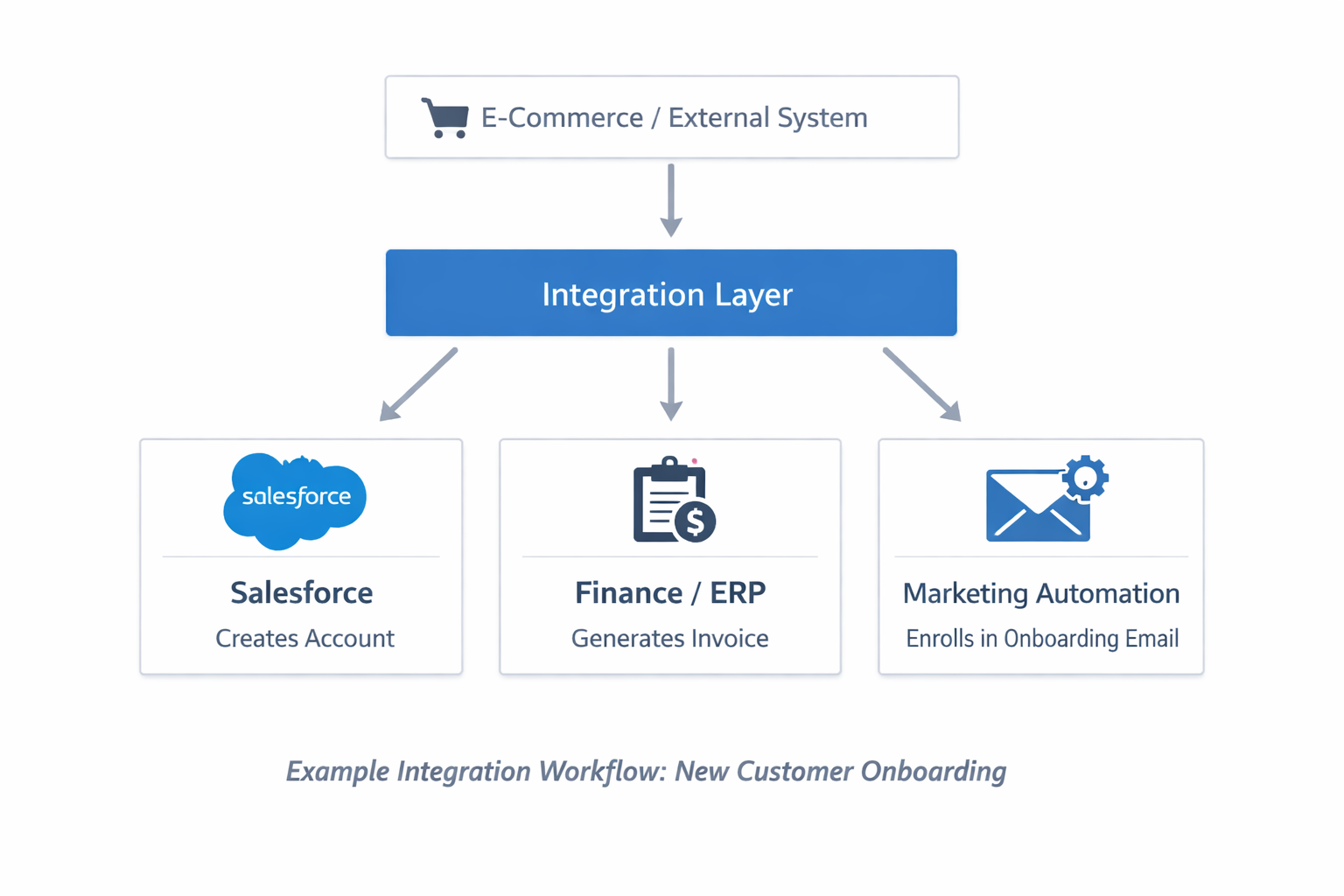
The diagram above illustrates a typical customer onboarding integration workflow. It shows how data moves between different systems when a new customer interacts with a business platform.
External System: A customer action happens in an external platform (e.g., e-commerce).
Integration Layer: Theintegration platform receives and processes the data.
Salesforce Update: Salesforce automatically creates a customer account.
Finance/ERP: The finance system generates the invoice or billing record.
Marketing Automation: The customer is added to onboarding or welcome email campaigns.
Now that we understand how integration workflows operate, it’s useful to review popular tools that connect Salesforce with other business systems.
Popular Tools for Connecting Salesforce
1.MuleSoft Anypoint Platform
MuleSoft Anypoint Platform is Salesforce’s leading integration platform built for organizations that operate multiple systems across departments. It enables businesses to connect applications, services, and data sources using reusable APIs.
The platform provides over 250 prebuilt, certified, and community-driven connectors, allowing companies to quickly integrate popular enterprise applications and infrastructure services.
Examples include connectors for DocuSign, Salesforce, Workday, and Zoom, as well as cloud infrastructure services such as Azure Data Lake, Amazon S3, and Google Pub/Sub.
For a complete list of connectors, you can visit the official MuleSoft connectors page.
Key Highlights
An API-led integration model that allows reusable services across systems
Extensive connector ecosystem for enterprise applications and databases
Advanced data transformation and orchestration capabilities
Centralized monitoring, governance, and security controls
Built to support large-scale enterprise environments
Best For
Complex technology ecosystems
High integration volume
Strong compliance and governance requirements
2. Zapier
Zapier is a popular automation platform designed to connect everyday applications and automate simple workflows without requiring coding knowledge. It allows users to create automated processes, called “Zaps,” that trigger actions between different tools based on specific events.
Instead of manually moving data between applications, Zapier enables businesses to automate routine tasks by connecting thousands of popular apps through prebuilt integrations.
Zapier offers a wide range of app integrations, making it easy to automate workflows across tools. You can browse all available apps in the Zapier integrations directory.
Key Highlights
Simple no-code automation platform suitable for non-technical users
Large library of integrations with thousands of popular SaaS applications
Fast setup for creating simple, event-based workflows
User-friendly interface for building and managing automations
Helps teams automate repetitive tasks quickly
Best For
Small and medium-sized businesses
Simple workflow automations between SaaS tools
Department-level productivity automation
3. Dell Boomi
Dell Boomi is one of the early pioneers of Integration as a Service(iPaaS). It provides a cloud-based platform that allows organisations to connect applications, data, and systems across cloud and on-premises environments.
Boomi is particularly known for its strong Master Data Management capabilities, which help organisations maintain clean, accurate, and consistent data across multiple systems.
For example, it can ensure that customer records remain synchronized across CRM, ERP, marketing, and support platforms.
Key Highlights
Cloud-native integration platform designed for scalable integration.
Strong Master Data Management for maintaining consistent customer and business data.
Large library of prebuilt connectors for enterprises and SaaS applications.
Low-code interface that simplifies integration development.
Real-time data synchronisation across multiple systems.
Best for
Organisation managing data across many systems.
Businesses that require data governance and consistency
Companies are looking for a scalable cloud-based integration platform.
4. Workato
Workato is an American multinational software company that provides a cloud-based platformfor automation, integration, and artificial intelligence orchestration across applications, data, and systems. Workato aims to empower business users to automate workflows and integrate applications easily
On October 1, 2025, Workato introduced the Enterprise Model Context Protocol,which is promoted as the industry’s fastest and most secure platform for AI agents.
Key Highlights
Integration capabilities: Workato connects over 1,000 applications, both cloud-based and on-premises, allowing seamless data flow and process automation across different systems.
Automations Recipes: Users can create “recipes,” which are automated workflows that define triggers and conditions.
This feature allows proactive suggestion and predictive analytics, helping users optimise their automation process by learning from historical data and integration patterns.
Event-Driven Architecture: Workato supports real-time event triggers, enabling workflows to respond immediately to changes in data or system states, which enhances responsiveness and efficiency.
Robust Security and Governance: Workato ensures data security with encryption,role-based access control, and compliance monitoring, making it suitable for enterprise-level applications.
Best For
Businesses looking for AI-driven automation and faster implementation
Non-technical users who want to build integrations easily
Organizations aiming to automate workflows across multiple tools
Companies seeking a scalable and modern cloud-based integration platform
5. Informatica Cloud
Informatica Cloud is a data integration platform (iPaaS) that supports API integration and Salesforce integration to manage and sync data across systems.
It can connect to on-premises, cloud-based applications, databases, file feeds, and even social networking sites.
It’s Connectors deliver connectivity to an enterprise application or database. Connectors exist for many systems, including ACORD, Google BigQuery,Goldmine, JD Edwards, MS Access, MS Dynamics, MS Great Plains, MS Navision, Netsuite, Oracle EBS, and Salesforce.It has a unique property to connect, process, and fetch from different types of mixed sources.
For example, we can connect with more than one server database. Here we connect to both Oracle and Microsoft SQL Server databases. It also integrates the data into another system.
Key Highlights
Advanced data integration and ETL (Extract, Transform, Load) capabilities
Supports API-based and Salesforce integration through connectors
Scalable cloud-native platform for enterprise use
Enables secure data exchange between applications and systems
High security and compliance standards for sensitive data
Best For
Large enterprises handling complex and high-volume data
Organizations requiring strong data governance and compliance
Businesses focused on data quality and data-driven decision-making
Companies need a robust and scalable enterprise integration solution
While these tools provide powerful capabilities, selecting the right one depends on how well it aligns with your requirements.
How to Choose the Right Solution for Your Business
Choosing a Salesforce integration platform isn’t just about picking a tool—it’s about deciding how your entire business will communicate behind the scenes. The right choice makes systems seamless. The wrong one turns simple workflows into frustration.
So before you commit, here’s what to consider:
1. Total Cost of Ownership – What’s the real price?
At first glance, a tool might seem affordable-but is it really?
The upfront cost is just one piece of the puzzle. Maintenance, training, and infrastructure often stay hidden until later. In some cases, cheaper tools demand more manual effort, while higher-priced ones quietly save time through automation.
So the real question is: are you saving money, or just postponing the cost?
2. Technical Fit – Who will actually use it?
A powerful tool sounds great—but what happens if your team finds it hard to use?
That’s where many businesses struggle. Some platforms are designed for simplicity, while others offer deep customization for technical teams.
The key isn’t choosing the most advanced option—it’s choosing one your team will actually use with confidence.
3. Integration Coverage – What are you really connecting?
Before picking any tool, pause and ask: What exactly needs to be connected?
Is it your CRM, ERP, marketing tools, or finance systems? And more importantly, do you need real-time updates, or will scheduled syncing work?
Here’s the catch: no single tool does everything perfectly. The right choice depends entirely on your specific needs.
4. Security & Compliance – Can you trust it with your data?
Data is one of your most valuable assets—so how much trust can you place in your integration tool? Security isn’t something to “figure out later.” It needs to be part of the foundation. Features like encryption, role-based access, audit logs, and compliance standards aren’t optional anymore.
Because once something goes wrong, fixing it isn’t just difficult—it’s expensive.
5. Scalability – Will it grow with you?
What works for you today might feel limiting tomorrow. As your data grows, your users increase, and your integrations expand, will your tool keep up—or slow you down?
Choosing a scalable solution isn’t just planning ahead—it’s avoiding future roadblocks.
6. Vendor Reliability – Who are you trusting long-term?
It’s easy to focus on features—but what about the company behind the tool? Will they still be reliable a few years down the line? Their reputation, roadmap, and support quality matter more than you might think.
Because in the end, you’re not just choosing a tool—you’re choosing a long-term partner.
Common Challenges When Connecting Business Systems
Even though integrations make processes faster and smoother, they also introduce challenges that businesses can’t afford to ignore.
Here are the key challenges:
1. Data Synchronization Gaps
The Challenge
Keeping data consistent across multiple systems can be tricky. Even with Salesforce integration tools, if updates in Salesforce don’t reflect in other applications, teams may end up working with outdated or
mismatched information.
The Solution:
Use cloud integration platforms like MuleSoft or Boomi, which act as reliable data integration solutions, to automate and sync data across systems, ensuring everything stays accurate and up to date.
2. API Limits and Performance Bottlenecks
The Challenge:
APIs have usage limits, and exceeding them can slow down or even break integrations, causing delays and workflow disruptions.The Solution:
Optimize API usage with batching, caching, and efficient design. You can also use middleware platforms to manage requests and reduce system overload.
3. Authentication and Security Management
The Challenge:
Managing secure access between systems can be complex. Weak credentials or expired authentication tokens can lead to failed integrations and potential data risks.The Solution:
Use secure authentication methods like OAuth, enable token refresh mechanisms, and apply role-based access control to protect data and ensure smooth connectivity.
Conclusion
Choosing the rightSalesforce integration tools can transform how your business operates. Whether you need simple automation or enterprise-grade integration, the right platform helps your systems work together seamlessly.
Focus on your business needs, team capabilities, and future growth before making a decision. Start small, scale gradually, and choose a solution that supports your long-term goals.
Stop managing tools. Start scaling your business.
Connect your systems, automate workflows, and unlock real growth with powerful Salesforce integrations.
Get Started Now →-
If your business uses a single platform, integration may not be critical. But with multiple tools, a lack of integration leads to disconnected data, manual work, errors, and slower decisions—ultimately affecting productivity.
-
Yes—when systems are connected, repetitive tasks get automated, data flows instantly, and teams spend more time on meaningful work instead of switching between tools.
-
Usually, when your team uses different tools, things can start getting confusing. Data stays in different places, and people may end up doing the same work again. Integration helps bring everything together and makes work easier and faster.
-
If your integrations frequently break, require constant manual fixes, or don’t scale with your business, it’s a strong sign your current tool isn’t the right fit.
-
Focusing only on features instead of actual business needs. The best tool isn’t the most powerful—it’s the one that fits your workflows and team capabilities.
Let’s Talk

Drop a note below to move forward with the conversation 👇🏻