Does Your Agentforce Agent Actually Need Salesforce Agent Script?
When I started digging into Salesforce Agent Script ahead of its GA, Salesforce had already published the six "Agentforce Levels of Determinism" framework, the syntax docs, and a sample app with 20+ recipes. Plenty of material on how to use Agent Script. What I couldn't find was guidance on when you actually need it. Or rather, when you don't.
Agent Script is Level 6 on that scale. The top. And after working through the framework, the recipes, and the early practitioner reports, my read is that most agents don't need to be there.
So I built the decision map myself: a practical framework for figuring out whether your use case genuinely needs L6, or whether you'd be better served by something simpler that doesn't compile, doesn't need version control, and doesn't add another codebase to maintain. That's what this article is.
What Are the Six Levels?
The Levels of Determinism framework describes a progression. At the bottom, your agent runs autonomously. At the top, you've scripted the reasoning itself. Each level tackles a different kind of failure, and understanding which failure you're actually seeing is the whole game.
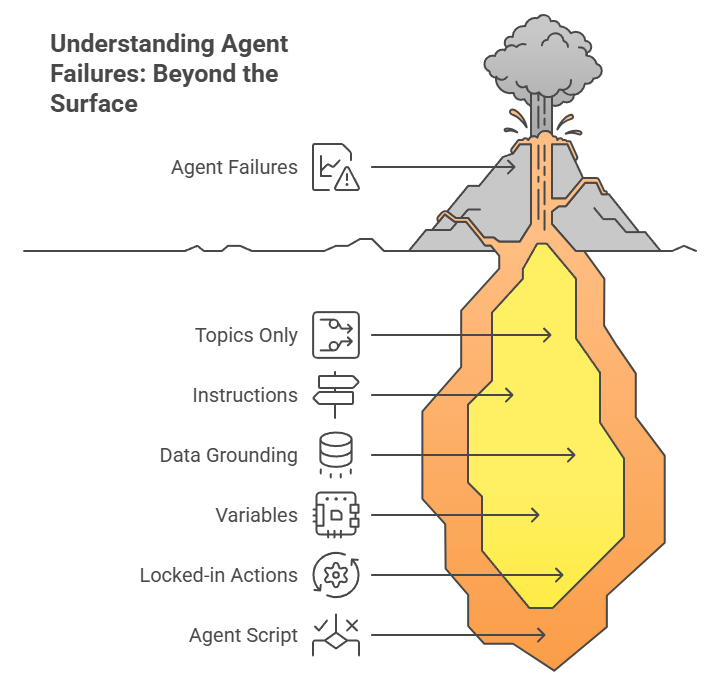
Level 1: Topics only. Your agent picks topics and actions on its own. No guardrails. In my view, good enough for a demo, not for anything that touches real customers.
Level 2: Instructions. You write natural language rules and guidelines. Most Agentforce agents today live here, and honestly, it works fine for straightforward Q&A and knowledge lookup. Where it falls apart is edge cases. You end up writing longer and longer prompts trying to force consistent behavior, which is exactly what Salesforce calls doomprompting.
Level 3: Data grounding. You connect the agent to CRM records, knowledge bases, external data. Here's a pattern that keeps coming up in early practitioner conversations: teams assume their agent has a reasoning problem when it's really a data problem. The agent is inventing order statuses because it doesn't have access to order statuses. That's not a scripting gap. That's a data gap.
Level 4: Variables. Session state that persists across conversation turns. The "I already told you my order number" problem. If your agent is losing context mid-conversation, variables fix that. Still no scripting needed.
Level 5: Locked-in actions.Flow, Apex, or API actions that run the same way every time the LLM calls them. The actions are reliable; the LLM just decides when to call them. In my assessment, this gets you to roughly 95% consistency for most production use cases.
Level 6: Salesforce Agent Script. Now you're scripting the reasoning itself. Hard-coded if/else blocks handle routing. Prompt pipes (|) change the LLM's tone conditionally. Actions fire in a guaranteed sequence. You're mixing deterministic logic with LLM flexibility in the same topic, which is powerful, but it comes at a cost.
Here's the thing: everything up to L5 is configuration. L6 is code. It compiles, it needs tests, it needs version control, it needs someone to maintain it when the business rules change. So the question worth asking is whether your specific failures actually require that jump.
When Do You Actually Need Level 6?
My recommendation: start at L2 and move up only when you can point to a concrete failure that the current level can't handle.
Agent inventing facts? That's likely an L3 problem. Connect it to your data before you even think about scripting. I initially assumed this would be a reasoning issue in most cases. The data suggests otherwise: it's almost always a grounding issue.
Agent forgetting what the customer said two turns ago? L4. Add session values. This is a surprisingly common complaint that has a simple fix.
Agent calling the wrong action or skipping steps? Try L5 first. Tighten your action setup, add input checks, make the action names unambiguous.
Agent routing to the wrong topic entirely? Now we're in L6 territory. Agent Script's start_agent block lets you write routing logic that evaluates before the LLM even sees the user's message. That's a fundamentally different capability from anything in L2 through L5.
Need the LLM to behave differently based on runtime conditions? Also L6. Prompt pipes (|) let you assemble different instructions depending on variable values. A $50K enterprise customer gets careful, thorough handling; a routine inquiry gets efficient friendliness. You pick which prompt based on hard logic. The LLM fills in the rest.
Must steps execute in a specific order for compliance reasons? L6 again. run @actions.X calls fire sequentially, every time, with zero LLM discretion on ordering.
One more that's easy to overlook: topic navigation design. Agent Script gives you two very different routing tools, and the choice between them matters architecturally. transition to billing is one-way; the agent moves to billing and doesn't come back. Topic delegation (@topic.billing inline) is round-trip; billing finishes, control returns to the caller. That architectural choice? Only expressible at L6.
One Agent, Three Levels
Let me walk through the same use case at three different levels: an order status agent that needs to escalate high-value orders.
At L2 (natural language instructions):
You write: "When a customer asks about their order, check the order value. If it's over $10,000, be extra thorough and empathetic, and escalate to a senior agent. Otherwise handle it normally."
This works most of the time. But Salesforce's own doomprompting analysis makes the point well: "AI agents don't always do the same thing the same way." Sometimes the LLM just skips the value check. And as the doomprompting blog illustrates, even a 5% failure rate on something like order routing is a dealbreaker for most companies.
At L5 (locked-in actions):
You build a Flow action (flow://Get_Order_Value) that reliably pulls the order value. The data retrieval is now rock-solid. But the LLM still decides what to do with the result, so the routing choice remains a coin flip in edge cases.
At L6 (Agent Script):
topic order_routing:
   actions:
      action check_order:
         target: "flow://Get_Order_Value"
         inputs:
            order_id: @variables.order_id
         outputs:
            order_value: number
      action escalate:
         target: "flow://Escalate_Case"
         available when @variables.order_value > 10000
   reasoning:
      instructions:->
         run @actions.check_order
         if @variables.order_value > 10000
            | High-value order. Be thorough and empathetic.
            run @actions.escalate
         else
            | Standard order. Be efficient and friendly.
Look at what's happening here. The if block is code; it runs identically every time. The | prompt lines tell the LLM how to talk, but they don't control where the conversation goes. And that available when gate? The LLM literally cannot see the escalation action unless the order value crosses the threshold. Routing: 100% deterministic. Tone: as flexible as you need it to be.
L2 is handing a new employee a job description and hoping they follow it. L5 is giving them reliable tools on top of that job description. L6 is handing them a checklist where certain steps (like "verify the order value") are mandatory and non-negotiable, while other steps (like "be empathetic") are guidelines they can interpret. The checklist guarantees the critical stuff happens every time. Their judgment handles everything else.
What Kills Agent Script Projects?
Overscripting. Salesforce warns about this directly: "Overscripting can stifle an agent's ability to build rapport, understand unique user needs, and respond effectively in real-time to dynamic circumstances." It's easy to fall into the trap of scripting the greeting, the empathy cues, the closing. At that point you've spent six months building a sophisticated IVR menu. Let the LLM handle the human parts. That's what it's good at.
Underscripting. The flip side, and arguably more dangerous. You've got a must-follow compliance path, and you're relying on prompt instructions to enforce it. This is the doomprompting trap. If a missed step means legal exposure or financial loss, natural language instructions aren't enough. Script it.
Flow-in-Script. The instinct is to rebuild Flow logic inside Agent Script. That's fighting the tool. Agent Script only supports + and - math; there's no multiply, no divide, no else if (you need separate if blocks instead). Calculations, data transformations, integrations with outside systems: those belong in Flow or Apex. Agent Script orchestrates the calls. Flow and Apex do the heavy lifting.
Skipping levels. This is likely the most common pattern once Salesforce Agent Script goes GA. A team reads about it, gets excited, and starts building at L6 without first checking whether L3 or L4 would've solved their actual problem. The cost of over-engineering here isn't just the initial build. It's the ongoing maintenance, the testing overhead, the developer who has to debug scripted reasoning when a simple Flow update would've been enough.
Detailed Comparison for Agentforce Levels of Determinism - Level 5 Vs Level 6
| Decision Criteria | Flow / Locked Actions (L5) | Agent Script (L6) |
|---|---|---|
| Primary Control | Probabilistic: The LLM chooses when to call the action. | Deterministic: Logic is hard-coded via if/else. |
| Routing Logic | Handled by Natural Language instructions. | Handled by structured code and `transition`. |
| Tone Control | Single static system prompt. | Dynamic prompts via pipes (`|`) based on data. |
| Complexity | Low - Setup via Flow Builder. | High - Requires coding and version control. |
The Bottom Line
Agent Script is Level 6 for a reason. It's the most powerful control surface Salesforce has shipped for Agentforce, and for the right use cases, it's exactly what you need.
But not every agent needs it. Start at L2, name your specific failure, move up one level at a time. If you can't name the failure that your current level doesn't handle? You likely don't need more scripting.
And this isn't a one-time assessment. Your agent will grow, handle new scenarios, hit new edge cases. Some of those paths will need the determinism that only L6 provides. Others won't. Revisit the map regularly.
What's your experience? Are you fighting the doomprompting battle at L2, or have L3 through L5 covered most of your cases? Doubts about Agentforce Pricing, Agentforce Ai, etc? Thoughts?
This is Part 1 of The Agent Script Practitioner's Guide, a 4-part series. Next: The Org Audit You Need Before Writing Your First Agent Script.
Further Reading
Levels of Determinism - Salesforce's own framework (the foundation this article builds on)
Agent Script Decoded: Language Fundamentals - Syntax reference with examples
Agent Script Recipes Sample App - 20+ working hybrid reasoning examples
Doomprompting: Why Prompt-Tuning Isn't Enough - Salesforce's analysis of the problem Agent Script solves
Agent Graph: Toward Guided Determinism - Architecture deep-dive on hybrid reasoning
Building on Salesforce? Concret.io helps enterprises architect what actually ships.
Let’s Talk

Drop us a note, we’re happy to take the conversation forward 👇🏻